My role
UX Writer / Content Designer responsible for:
Designing conversation flows
Structuring chatbot content and user-facing pathways
Defining escalation points and human handoffs
Aligning content decisions with support, product, and operational goals
Systems thinking, content design thinking
Problem
Our support team was overwhelmed and missing response time SLAs. This led to increased escalations, user frustration, and churn.
Analysis revealed that 70% of playback-related tickets were solved by one simple step, a reboot, yet agents were still spending 10 minutes per call logging and repeating troubleshooting steps.
Solution
We needed to reduce agent workload by enabling users to self-serve common issues, without affecting the support experience.
Challenge - how to fix the problem
Research
Working with Support and Product, I reviewed Freshdesk data and ticket logs to identify high-volume queries. Playback issues were frequent and most were solvable with resets or by reviewing network and firewalls. In team interviews, we identified friction points with IT setup, hardware and training.
Solution
We were short on time and resource, so instead of referring to our user journey map and redesigning onboarding, we agreed to pilot a chatbot hosted in Zendesk - a faster, low-cost way to automate repetitive tickets.
I then had a meeting with our Integration Specialist. We agreed to:
Create the initial flows using https://app.diagrams.net/ as UX was easy to navigate
Capture details from the user upfont, reducing manual input from agents.
Give users the option to "connect to a real person" at various touchpoints to minimise frustration.
Auto-assign certain ticket types straight to CSMs
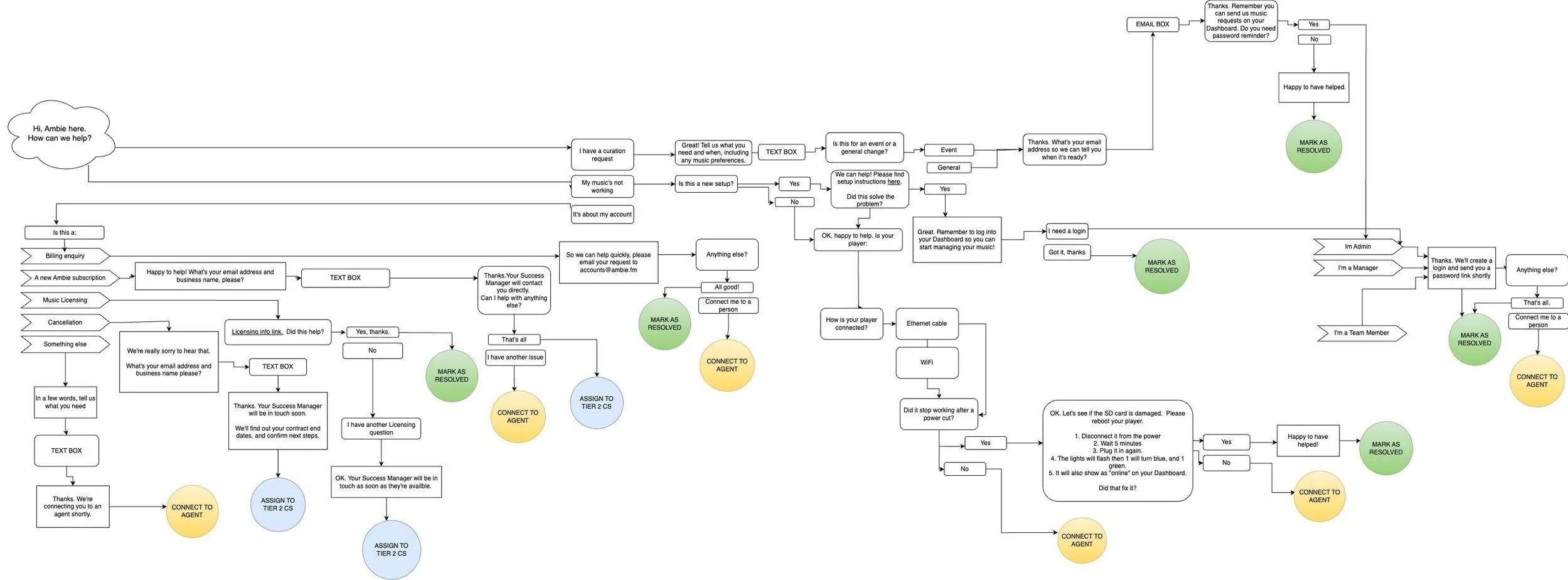
Challenge - Structuring for simplicity
I split request types into categories: Curation, Billing, Playback, and General Account, draftting conversations on paper. I grouped flows by user intent e.g. “My music not working” or “I want a new playlist” and worked forward from there.
Solution
To reduce cognitive load, I compared copy in the interactions to copy on our website and app. I then iterated and “I want a new playlist” became “Submit a request” as users were already familiar with this CTA.
Challenge - Establishing tone of voice
The bot needed to sound like us - human - but we didn’t have ‘voice & tone guidelines’ at company level. Time restraints meant we were limited to hallway tests.
Solution
I used a conversational voice that described issues using users’ words:
Clear, simple language
Conversational, but not overly casual
Reassuring when users hit issues
Framing actions clearly e.g “Restart your player”
I iterated quickly, testing phrasing with support and customer success to refine language and grammar, improve clarity, and re-route dead ends.


Challenge - Designing around technical limitations
With no NLP, Freshdesk couldn’t interpret free-text inputs, so if a user typed something unexpected the bot would repeat itself. During testing, this caused a lot of frustration and most users left the chat within 4 attempts.
Solution
I introduced escape hatches at key moments:
“Did this answer your question?” (Yes / No)
“Connect to a person” options throughout flows
These optional exits provided an escalation point without relying on NLP triggers
This gave users control, prevented dead ends and chat abandonment.
Challenge - Handling authorisation requests
40% of tickets related to curation requests, but not all users were allowed to make these changes.
Solution
With no way to verify credentials, I introduced a light gating mechanism. “Yes” triggered a data capture flow. “Not sure” redirected user to their Admin.
This wasn’t entirely secure, but this interaction reduced the risk for unauthorised requests while keeping the experience smooth.
Project Results
Agents providing basic troubleshooting decreased by 60%
A 44% decrease in users contacting Support to request schedule changes
CSAT score - in progress
What would further validate this project
Support ticket language analysis
Before/after comprehension testing
Analysis to show which specific content decisions drove which outcomes
What I learned
Clear, structured content can significantly reduce operational load as well as improve UX
In constrained environments, conversation design matters more than advanced tools
Giving users control (escape routes) is critical to maintain trust in automated environments
When appropriate, tone can be established with internal testing, user awareness and iteration